WebTolk Joomla Extensions
113 Extensions
12 Categories
587 Versions released
921303 Downloads
Joomla 5+ package for Russian Post API integration: data normalization, delivery calculation, shipment creation, batches, documents, returns, post office lookup, dictionaries and SOAP tracking.

WT Otpravkapochtaru is a Joomla 5+ package that helps Joomla extensions work with Russian Post's Otpravka REST API and the SOAP tracking service. The package contains a library and a system plugin that stores connection settings.
This document is prepared for the SW JProjects project page. It does not replace the full developer reference in the repository. Its purpose is to explain the practical workflow: connect the account, normalize user data, calculate delivery, create a shipment, build a batch, generate documents, create returns and request tracking data.
Official Russian Post documentation is available at: https://otpravka.pochta.ru/specification#/main.
ext-mbstringext-simplexmlext-soap (optional, only for tracking)ext-zipThe official Otpravka specification is organized around large API areas: authorization, data preparation, orders, batches, documents, returns, settings, post office lookup, property dictionaries and additional service modules. The public library facade follows this model where it is useful for a regular Joomla integration.
Supported areas:
Not exposed as dedicated public methods:
This is intentional. The package covers the main shipping and tracking workflow without turning the Joomla integration into a full mirror of the official specification.
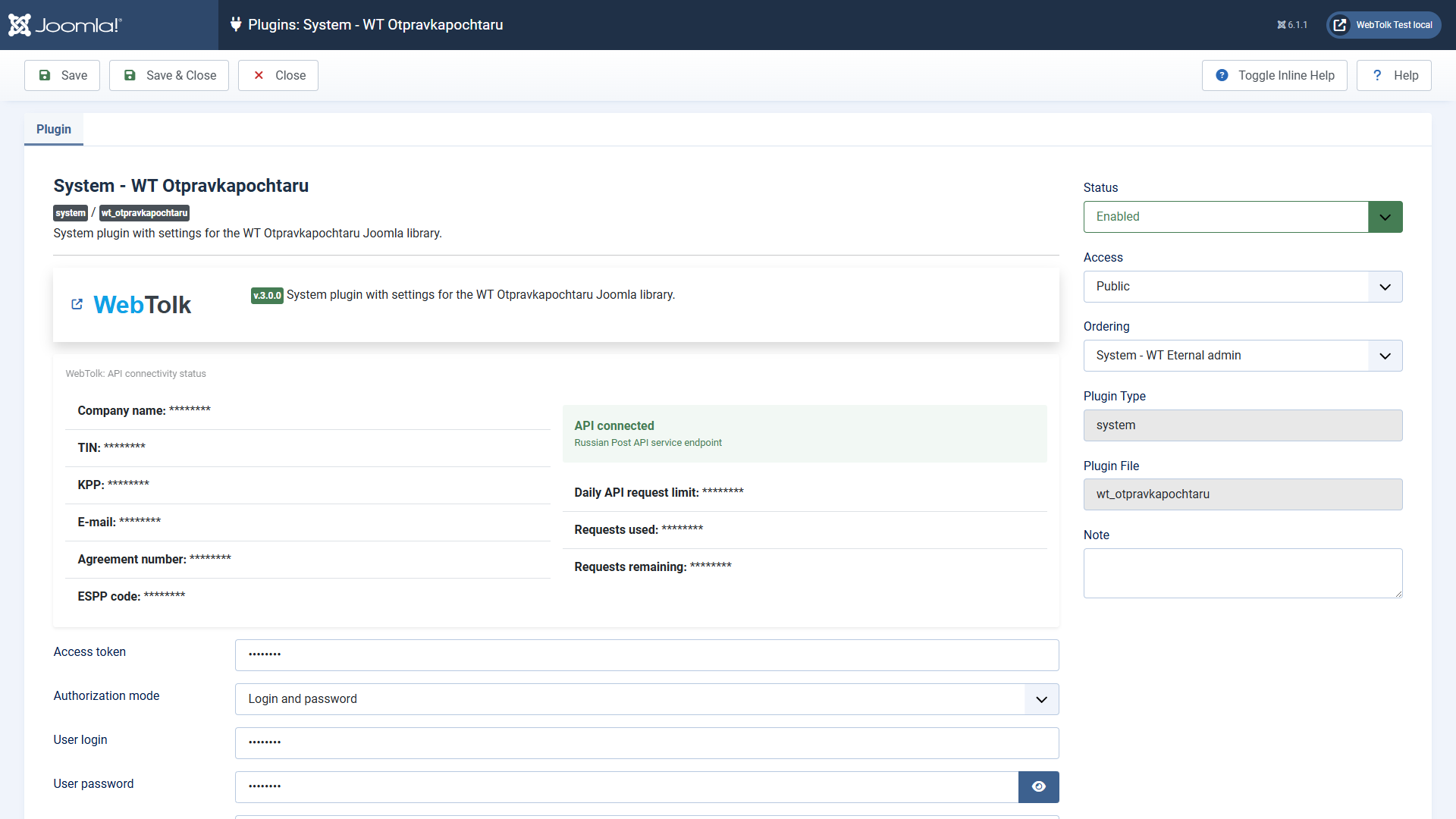
Install the ZIP package with the standard Joomla extension manager. After installation, open the System - WT Otpravkapochtaru plugin and fill in the connection settings:
For production sites, keep real credentials only in Joomla settings or in a protected configuration provider. Do not place them in code, examples, logs or public documentation.
Do not create a shipment directly from raw form input. First, transform user-entered data into the shape expected by Russian Post.
This order reduces API errors and makes the integration easier to debug.
<?php

declare(strict_types=1);

use LapayGroup\RussianPost\AddressList;
use LapayGroup\RussianPost\Enum\MailCategory;
use LapayGroup\RussianPost\Enum\MailType;
use LapayGroup\RussianPost\Enum\PaymentMethods;
use LapayGroup\RussianPost\FioList;
use LapayGroup\RussianPost\ParcelInfo;
use LapayGroup\RussianPost\PhoneList;
use Webtolk\Otpravkapochtaru\Otpravkapochtaru;

defined('_JEXEC') or die;

// The library reads settings from the enabled Joomla system plugin; an array of parameters can be passed explicitly, but this example shows the Joomla way.
$client = new Otpravkapochtaru();

$api = $client->otpravkaApi();

$addresses = new AddressList();
$addresses->add('410000, Saratov, Moskovskaya St., 1');
$normalizedAddress = $api->clearAddress($addresses);

$names = new FioList();
$names->add('Ivanov Ivan Ivanovich');
$normalizedName = $api->clearFio($names);

$phones = new PhoneList();
$phones->add('+7 900 000-00-00');
$normalizedPhone = $api->clearPhone($phones);

$parcel = new ParcelInfo();
$parcel->setIndexFrom(410000);
$parcel->setIndexTo(685000);
$parcel->setMailType(MailType::PARCEL_POSTAL);
$parcel->setMailCategory(MailCategory::ORDINARY);
$parcel->setWeight(1000);
$parcel->setPaymentMethod(PaymentMethods::CASHLESS);

$tariff = $api->getDeliveryTariff($parcel);

// Joomla uses Symfony's VarDumper implementation for dd().
dd($normalizedAddress, $normalizedName, $normalizedPhone, $tariff);
API money values are usually returned in kopecks. Divide them by 100 before displaying them to a user.
<?php

declare(strict_types=1);

use LapayGroup\RussianPost\Entity\Order;
use Webtolk\Otpravkapochtaru\Otpravkapochtaru;

defined('_JEXEC') or die;

// The library reads settings from the enabled Joomla system plugin; an array of parameters can be passed explicitly, but this example shows the Joomla way.
$client = new Otpravkapochtaru();

$order = new Order();
$order->setOrderNum('JSHOP-10001');
$order->setIndexTo('685000');
$order->setRegionTo('Magadan region');
$order->setPlaceTo('Magadan');
$order->setStreetTo('Lenina Avenue');
$order->setHouseTo('1');
$order->setRecipientName('Ivanov Ivan Ivanovich');
$order->setTelAddress('79000000000');
$order->setMailType('POSTAL_PARCEL');
$order->setMailCategory('ORDINARY');
$order->setMass(500);

$created = $client->otpravkaApi()->createOrders([$order->asArr()]);

// Joomla uses Symfony's VarDumper implementation for dd().
dd($created);
Use editOrder() to update an existing order and deleteOrders() to remove orders from the New state. Use returnOrdersToNew() when an order has to be moved back to New.
When orders are checked and ready to be handed over to a post office, create a batch:
<?php

declare(strict_types=1);

use LapayGroup\RussianPost\Providers\OtpravkaApi;
use Webtolk\Otpravkapochtaru\Otpravkapochtaru;

defined('_JEXEC') or die;

// The library reads settings from the enabled Joomla system plugin; an array of parameters can be passed explicitly, but this example shows the Joomla way.
$client = new Otpravkapochtaru();

$api = $client->otpravkaApi();
$batch = $api->createBatch([123456789, 123456790]);
$batchName = (string) ($batch['batch-name'] ?? '');

if ($batchName !== '') {
    $document = $api->generateDocPackage($batchName, OtpravkaApi::PRINT_FILE);
    file_put_contents(JPATH_ROOT . '/tmp/' . $batchName . '.zip', $document->getStream()->getContents());
}
Document methods return binary data. Store it in a protected location and do not send it to a browser without proper Content-Type and Content-Disposition headers.
A return shipment can be created for a direct shipment barcode or as a separate return shipment. Use the ReturnShipment entity when you want to assemble the payload explicitly and reuse it in tests.
Main methods:
createReturnShipment() creates a return for a previously created shipment;createReturnShipments() creates separate return shipments;editReturnShipment() updates a separate return shipment;deleteReturnShipment() deletes a separate return shipment.Post office lookup methods are useful before order creation. They can validate a postal code, find a nearby office and list available services.
<?php

declare(strict_types=1);

use Webtolk\Otpravkapochtaru\Otpravkapochtaru;

defined('_JEXEC') or die;

// The library reads settings from the enabled Joomla system plugin; an array of parameters can be passed explicitly, but this example shows the Joomla way.
$client = new Otpravkapochtaru();

$api = $client->otpravkaApi();
$office = $api->searchPostOfficeByIndex('685000');
$services = $api->getPostOfficeServices('685000');

// Joomla uses Symfony's VarDumper implementation for dd().
dd($office, $services);
The country list is local and does not spend the REST API request limit.
The Otpravka REST API is used for shipment preparation. Tracking operations use Russian Post's SOAP service, so they require separate credentials.
<?php

declare(strict_types=1);

use Webtolk\Otpravkapochtaru\Otpravkapochtaru;

defined('_JEXEC') or die;

// The library reads settings from the enabled Joomla system plugin; an array of parameters can be passed explicitly, but this example shows the Joomla way.
$client = new Otpravkapochtaru();

$operations = $client->trackingApi()->getOperationsByRpo('12345678901234', 'RUS');

// Joomla uses Symfony's VarDumper implementation for dd().
dd($operations);
If the account has no SOAP tracking access, REST shipping scenarios may still work.
For ease of debugging and development, the repository has a folder with JSON obtained from real API requests. The images are relevant at the time of the release. There may be changes in the actual API responses over time.