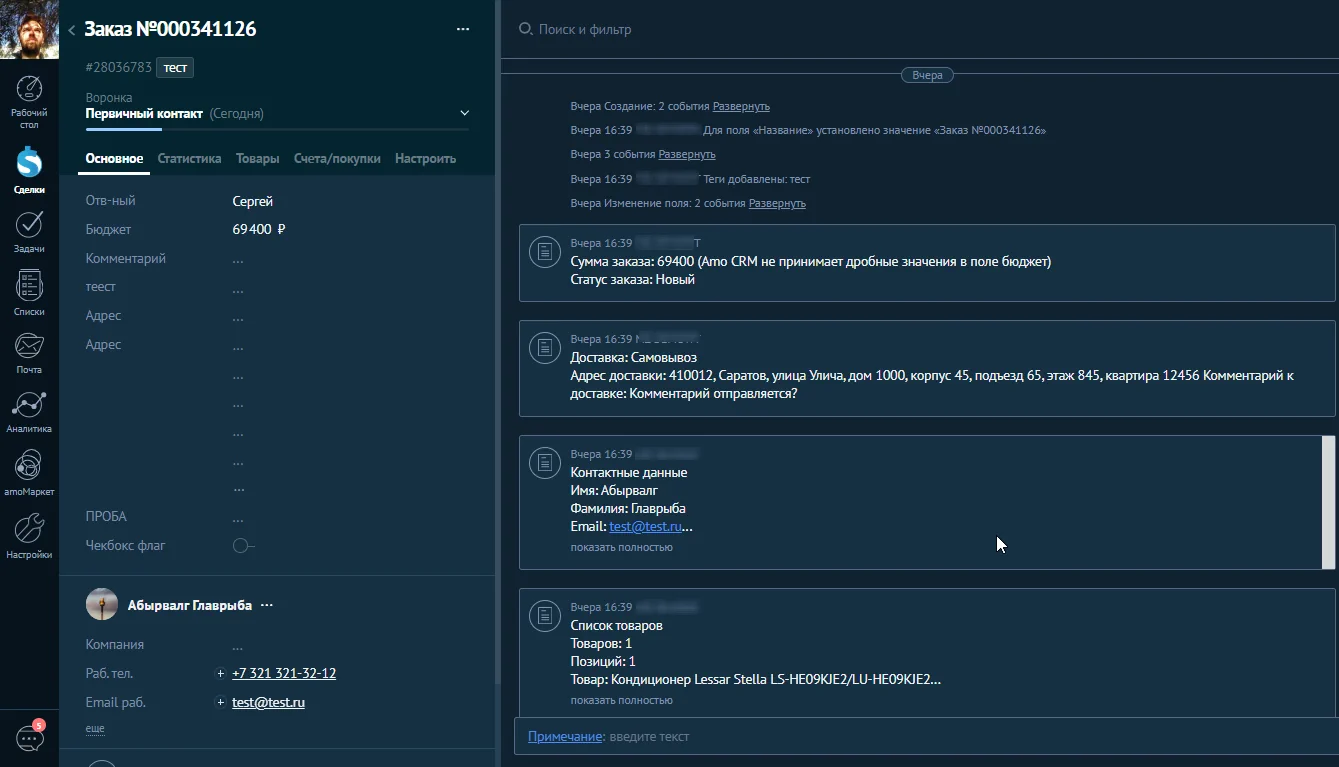
The plugin can send order data from the online store component RadicalMart to amoCRM, as well as leave notes to the transaction when changing the order status (select the necessary RadicalMart order statuses in the plugin settings).
For the plugin to work, you need to install and configure the WT Amo CRM library v.1.3.0+ for Joomla.
WT Amo CRM library
A small PHP library for Joomla 4 / Joomla 5 / Joomla 6 and Amo CRM. For developers. AmoCRM as known as Kommo CRM (https://www.kommo.com/)
creating deals in amoCRM at the time of order creation in the RadicalMart online store
choosing the amoCRM funnel in which to create deals
selecting the tag that will mark the created transactions
in the transaction comment, when creating an order, write:
the exact total amount of the order (Amo CRM does not accept fractional values in the budget field, for example, with kopecks)
order status
Delivery information (method, address, and comment)
information about the payment method
Buyer's contact details (may differ from the details of the user who created the order. For example, if the delivery is for another person)
direct link to the order in the website administration panel
list of order items (optional)
adding a comment to the transaction when the order status changes in the RadicalMart online store (select the required order statuses in the plugin settings)
adds a link to the transaction in amoCRM to the order viewing interface, if one is found (matching orders and transactions is stored in the database)